What are Live events in Microsoft Teams and what are the requirements for an organization?
Teams live events, users in your organization can broadcast video and meeting content to large online audiences.
Microsoft 365 live events bring live video streaming to a new level. Live events encourage connection throughout the entire engagement lifecycle with attendees before, during, and after live events. You can create a live event wherever your audience, team, or community resides using Teams or Yammer.
Teams deliver chat-based collaboration, calling, meetings, and live events, so you can expand the audience of your meetings. Teams live events are an extension of Teams meetings, enabling users to broadcast video and meeting content to a large online audience. Live events are meant for one-to-many communications where the host of the event is leading the interactions and audience participation is primarily to view the content shared by the host. The attendees can watch the live or recorded event in Yammer or Teams and can interact with the presenters using moderated Q & A or a Yammer conversation.
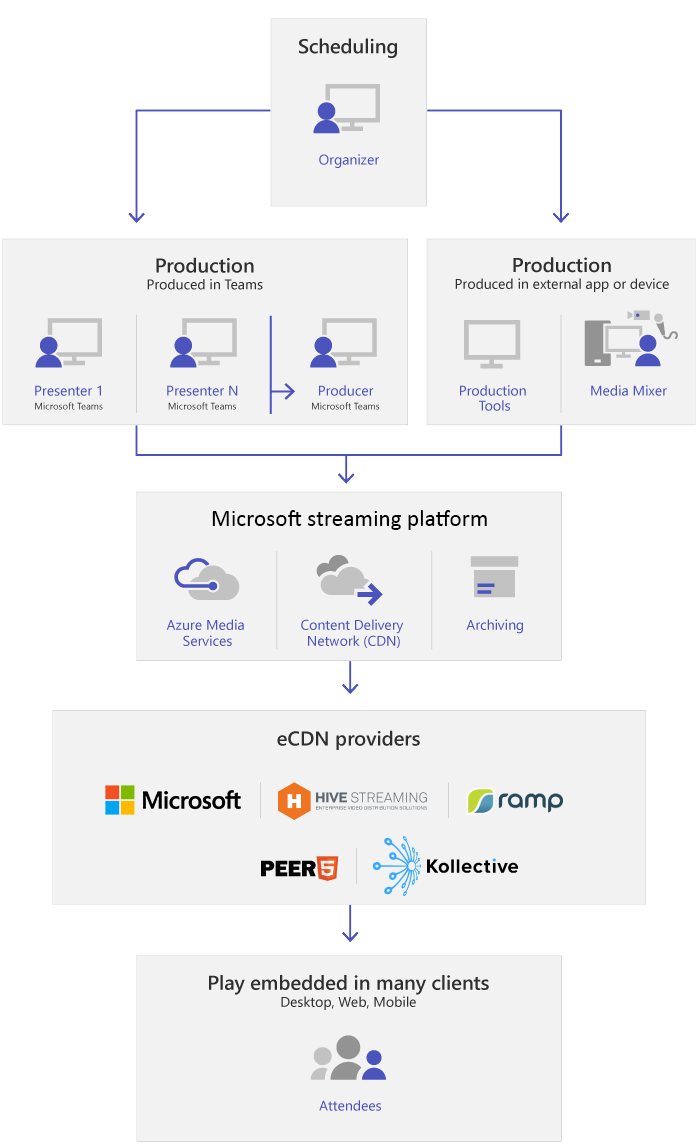
The following prerequisites are required for the user to schedule a Teams to live event.
Here are the licenses that must be assigned to organize, produce or present a Teams live event:
- To organize: A Microsoft or Office 365 Enterprise E1, E3, or E5 license, [or] a Microsoft or Office 365 Education A3 or A5 license.
- To produce or present: A Microsoft or Office 365 Enterprise E1, E3 or E5 license, [or] a Microsoft or Office 365 Education A1, A3 or A5 license. The exception to this requirement is guest users can present without a license if the other criteria for guest users is met.
- A Microsoft Teams license - this license is included in the licenses listed in the first and second bullets.




No comments:
Post a Comment